
BalanceBuild Pro
AIA G702 pay applications without rebuilding Excel
Answer first: AIA G702 pay application software should bill from the same record as the Gantt. Linked SOV lines show a From Gantt meter, the same brand-blue progress bar as the schedule. CSI divisions share a left rail and chip on both screens. You can jump either way. Then Generate Draft, plus Stored materials, and enter the amount due in QuickBooks. You do not rebuild a second spreadsheet at month end.
You do not have to run the job through the AI wizard. Create the project by hand, type your own SOV, and progress the Gantt if you prefer. The wizard is still the stronger setup. CSI pay apps live in Financials. Public plans start at $49/mo. Builder Pro at $199/mo is where we name financial dashboards. 30-day trial, no credit card.
10-minute pay app walkthrough
Watch how to track construction pay applications from the same record as the schedule. Specs into the Agentic wizard, CSI dollars on the schedule of values, then Generate Draft and Commit from Gantt progress. Billed-to-date and Stored materials stay on that job. The video stays on this page.
Chapters: how to track a pay app
- 0:00 How to track a pay app from the schedule: Pay applications should follow the same CSI job as the Gantt, not a rebuilt spreadsheet at month end.
- 0:48 Agentic project wizard: Drop specs, addenda, drawings, constraints, and site files so CSI comes from the packet.
- 3:20 CSI dollars on the schedule of values: Type contract amounts on the SOV. Save so billed-to-date has a budget to track against.
- 5:10 Gantt percent complete: Progress lives on the schedule. Change it on the Gantt, not by editing the pay app form.
- 6:20 Stored materials: Post stored dollars when product is delivered but not installed, then bill that amount.
- 7:05 Generate Draft and Commit: Preview the G702/G703-style pencil copy. Nothing hits billed-to-date until you Commit.
- 9:20 Keep the books honest for the next period: Older applications stay locked. Enter the amount due in QuickBooks. Do not rebuild Excel for period two.

Keep the accounting system you already run
You do not have to abandon QuickBooks to get a clean pay app. BalanceBuild Pro is the field-to-SOV record: schedule percent complete, Stored materials, retainage, and the pencil copy. When the application is committed, enter the amount due in QuickBooks as you already do. Each pay app can export an accounting CSV with invoice number, customer, project, phase, work completed this period, materials stored this period, and amount billed.
Settings include an optional QuickBooks Online connection for other office work. This walkthrough does not claim that pay apps post themselves as QuickBooks invoices.
Step 1
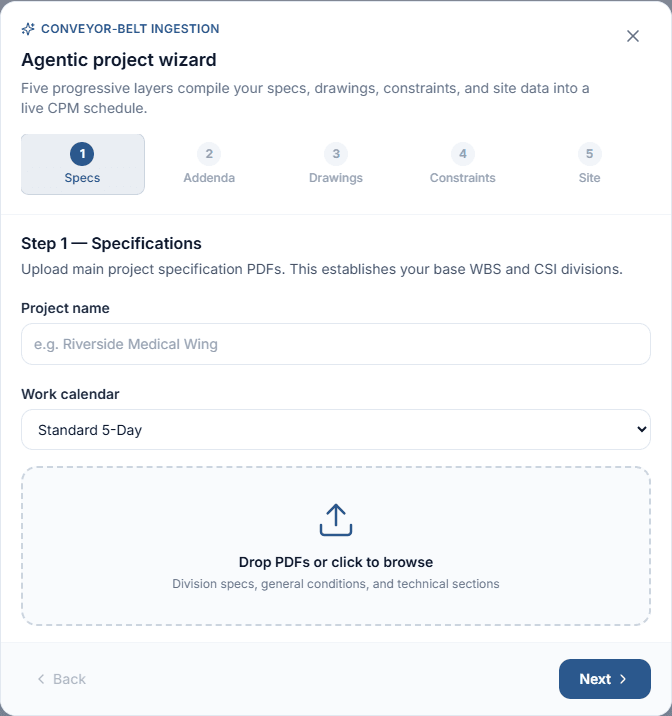
The wizard is better. A hand-built SOV still works.
You are not required to put the job through the AI engine. On Projects, use Create manually, then on Financials use Add line item. Type the phases and contract dollars, update Gantt percent complete, post Stored materials, and Generate Draft. That path is there for owners who would rather not upload specs to an AI wizard.
It is not the strongest use of the program. The wizard reads specification PDFs (division specs, general conditions, technical sections) so CSI divisions and the WBS come from the spec book. Linked lines then share a From Gantt meter and CSI rail with the schedule. Manual lines stay unlinked until you connect them: a dash, no bar, muted rail. Either way, you still type the dollars. The wizard does not replace that entry.
Step 2
Schedule of values: progress, stored materials, billed to date
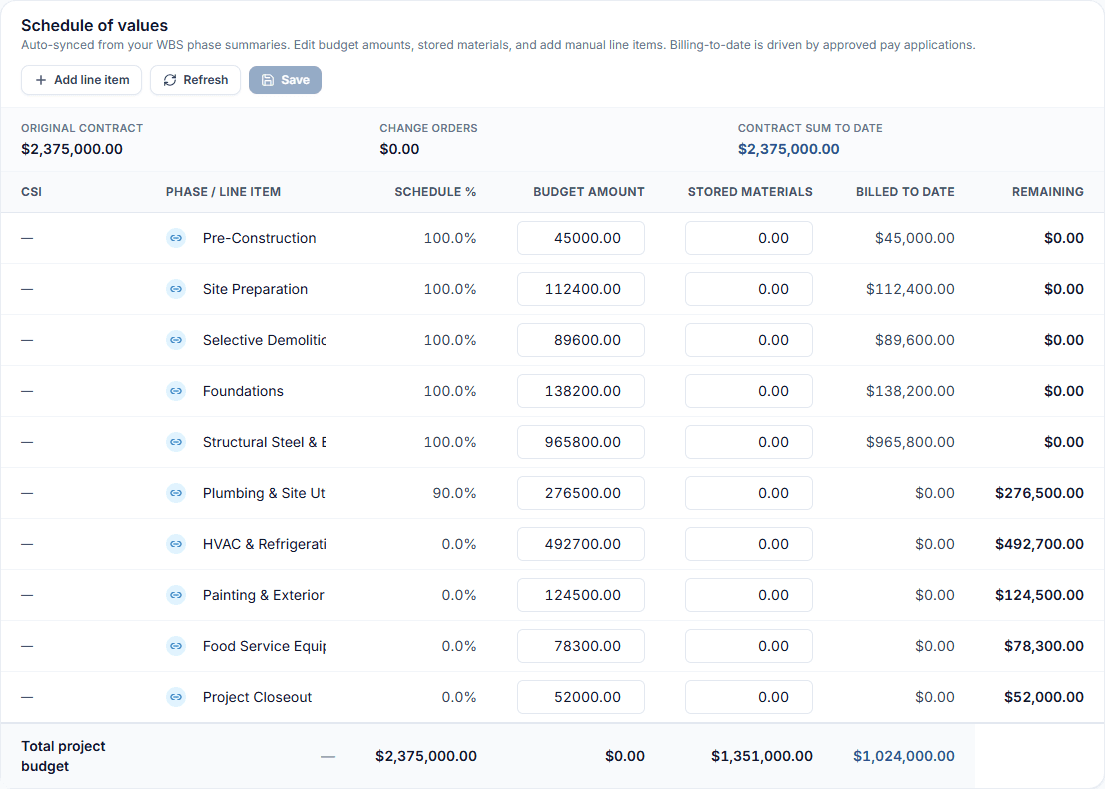
Financials shows Original Contract, change orders, and Contract Sum to Date. Each linked SOV line has a From Gantt meter (average percent complete of that summary's child tasks), Budget amount, Stored materials, Billed to date, and Remaining. Custom or unlinked lines show a dash and no bar. Daily logs are backup, not a second progress grid.
Stored materials means materials delivered but not installed. Enter the dollars on the phase when the pallet is on site. On Commit, billed-to-date includes work this period plus that stored amount.
Step 3
Same meter, same CSI rail, click to the matching row
Linked Financials lines and Gantt summaries share one progress widget labeled From Gantt: a brand-blue track with the percent on the right. Concrete (CSI 03) is the same stripe on both pages. That identity is a 4px left rail and a matching CSI chip, not a recolor of the Gantt bars. Bars still mean schedule health: brand blue, critical-path gold, or past-due red.
The link on an SOV row opens that project's Gantt on the matching summary: scrolled, selected, and gold-ringed. From a Gantt summary, the SOV chip opens Financials with that budget line highlighted. Custom or unlinked lines keep a muted rail and a dash. No bar.
| What you see | Gantt | SOV / Financials |
|---|---|---|
| From Gantt meter | % column on every row. Summaries average children. | Same bar on linked lines. Average of that summary's children. Tooltip names the source. |
| CSI identity | 4px left rail + chip on the summary row (03, 05, 09). | Matching rail + chip. Custom lines get a muted rail. |
| Jump | SOV chip opens Financials with that line highlighted. | Link opens the schedule, selects the summary, gold ring. |
| What the pay app uses | Line percent on Generate Draft averages tasks that share the phase name, plus CSI special cases. Related to From Gantt. Not forced to the same formula. | |
Step 4
Generate Draft, preview, Commit
Click Generate Draft. The modal asks for Period to, Retainage %, and optional Permits and fees this period. Pay-app line percent averages tasks that share the phase name, with CSI special cases. That is related to the From Gantt meter. It is not the same formula. Preview the draft. Nothing hits billed-to-date until you Commit. If you catch a mistake, undo the latest invoice.
Each row has Preview, PDF, and Export CSV. For the process behind the numbers, see the G702/G703 Insights HowTo.
Step 5
AIA-style PDF or data-only stamp, then the books
BalanceBuild Pro can preview a full AIA-style pencil copy, or a data-only layout meant for stamping onto licensed pre-printed AIA stock when the owner requires that form. The PDFs are not licensed AIA Contract Documents. If the contract demands a purchased AIA form, use that form. BBP still keeps the SOV, From Gantt progress, Stored materials, and history so you are not rebuilding Excel to fill it.
Then enter the amount due in QuickBooks. That is the handoff. BBP organizes the pay app. Your accounting system still holds the invoice.
FAQ
- Is there a free AIA G702 Excel template?
- Many GCs search for an AIA G702 Excel spreadsheet or G702/G703 Excel template. Those workbooks drift from the Gantt and schedule of values by the second billing period. BalanceBuild Pro is AIA G702 pay application software: bill from Gantt percent complete and CSI SOV, post stored materials, then generate a G702/G703-style pencil copy. It is not a licensed AIA Contract Document and not a free Excel download.
- Do I have to leave QuickBooks to run pay apps in BalanceBuild Pro?
- No. BalanceBuild Pro organizes the G702/G703-style package from schedule progress and the schedule of values. You then enter the amount due in QuickBooks or whatever accounting system you already use. Each committed pay app also has an Export CSV for a line-level backup. This page does not claim that pay apps post themselves as QuickBooks invoices.
- What does From Gantt mean on the schedule of values?
- From Gantt is the shared progress meter on linked SOV lines. It uses the same brand-blue bar language as the Gantt task list. The number is the average percent complete of that linked summary's child tasks. Custom or unlinked SOV lines show a dash and no bar. Hover the meter for the source.
- Is SOV Schedule % the same number the pay app bills?
- They are related, not one formula. The SOV From Gantt meter averages the children of the linked Gantt summary. Pay-app line percent averages tasks that share that phase name, with CSI special cases. Confirm the Gantt before you Generate Draft. Unifying those formulas is not claimed here.
- How do I jump from an SOV line to the Gantt?
- On a linked SOV row, the link control opens that project's schedule with the matching summary selected and gold-ringed. From a Gantt summary, the SOV chip opens Financials with that budget line highlighted. CSI division uses the same left rail and chip on both screens. Gantt bars keep their own health colors (standard blue, critical-path gold, past-due red).
- Is there a video of BalanceBuild Pro pay applications?
- Yes. A 10-minute instructional walkthrough is embedded on this page. It covers the Agentic project wizard, CSI identity on Gantt and the schedule of values, Generate Draft, Commit, and how billed-to-date stays locked for the next period. Watch it here, or on YouTube at https://youtu.be/QApAB8stWZY.
- How do I track pay applications across billing periods?
- Keep billed-to-date, Stored materials, and committed pay app history on the same CSI job as Gantt percent complete. Update the schedule, generate the next G702/G703-style draft from that progress, then Commit. Older applications stay locked so you are not rebuilding Excel each period. The 10-minute walkthrough on this page shows that tracking loop.
- Do I have to use the AI project wizard?
- No. You can create the project by hand, add your own SOV lines, update Gantt percent complete, and Generate Draft from there. That is allowed. It is not the strongest use of the program. The wizard reads specification PDFs so CSI divisions and the WBS come from the spec book, and linked lines get a From Gantt meter. Manual lines stay unlinked until you connect them: a dash, no bar, muted rail.
- Does the project wizard fill CSI codes from the spec book?
- The Agentic project wizard uploads specification PDFs and builds a WBS with CSI notations on schedule tasks. You still review the schedule of values and type the contract dollars on each line. You can skip the wizard entirely and build the SOV by hand. If a job was created without that spec pass, the SOV CSI column can show a dash until codes are mapped. Unmapped or custom lines also get a muted identity rail.
- How do I generate a pay app in BalanceBuild Pro?
- Update Gantt percent complete, confirm the From Gantt meter on the SOV, post Stored materials, then click Generate Draft. Enter Period to, Retainage %, and optional permits and fees. Preview the pencil copy, then Commit. The most recent commit can be undone.
- Are BalanceBuild Pro PDFs official AIA Contract Documents?
- No. They are AIA-style pencil copies. If the owner requires licensed AIA stock, BalanceBuild Pro can output a data-only layout for stamping onto that form. Follow your contract. This is not legal advice.
- Which plan includes CSI pay applications?
- CSI pay apps live in Financials. Public plans start at $49/mo. Builder Pro at $199/mo is the plan where we name financial dashboards, more seats, and up to 6 live jobs. 12-month price lock, 30-day trial, no credit card.
Put one live job on the SOV this month
Start a trial, or book a diagnostic if you want help setting the billing habit first.
AIA, AIA Contract Documents, G702, and G703 are registered trademarks of The American Institute of Architects. QuickBooks is a registered trademark of Intuit Inc. Balance & Build Consulting, LLC is not affiliated with the AIA or Intuit. This page is educational and is not legal advice.